skip to main |
skip to sidebar
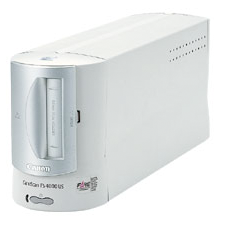
A few days ago I pulled out my Canon CanoScan FS4000US slide/negative scanner to do some image processing. It worked fine under Windows XP with Photoshop Elements but I didn't receive a very good feeling when I went searching for Mac drivers. I finally found the fs4000usosx103en.dmg driver file on Canon's support site. The description indicated the drivers are for Mac OS X however they haven't been updated in almost two years.
 Note that I am trying to install this on Mac OS X 10.5.4 (Leopard) on a 2.8GHz 24" iMac, it may work fine on ealier verions of Mac OS X.
After downloading and mounting the file I ran the FilmGet Installer. The installer tried to do its job and indicated success but it didn't put everything in the right places. Make sure that the contents of the folders in the dmg make it into the following locations:
fs4000usosx103en.dmg --> Macintosh HD
-------------------------------------------------------
Into CMPrefs ----------> /Library/ColorSync/Profiles
Into Lib_CFMSupport ---> /Library/CFMSupport
Into Users_Shared -----> /Users/Shared
Into Plug-in: The FilmGet FS folder should
go into your Photoshop Plug-Ins directory
For example I put the FilmGet FS folder into /Applications/Adobe Photoshop Elements 4.0/Plug-Ins
This worked fine for Elements but I installed Photoshop CS3 today, put the FilmGet FS folder in /Applications/Adobe Photoshop CS3/Plug-Ins and started Photoshop. This resulted in a plugin error and after looking at Photoshop's Help > System Info... dialog it indicated the FilmGet plug-in was not working.
It turns out that running Photoshop CS3 under Rosetta works. So for those times when I want to scan something in using CS3 I turn on Rosetta (Ctrl-click or right-click on the Adobe Photoshop CS3 application in Finder and select "Get Info"; make sure "Open using Rosetta" is checked) and run the program.
Kind of a mess and maybe Canon will update the drivers but I'm not holding my breath. The CanoScan FS4000US is a nice scanner, it cost several hundred dollars new, but it appears Canon has moved to flatbeds only and left the higher end slide/negative scanner market to Nikon.
I should also mention that VueScan apparently works fine with the Canon under Mac, that may be a good alternative for some.
One of the reasons I went with the 24" iMac over the 20" iMac is that I wanted a larger screen to help with image editing. Back in the Windows world my process included several programs: Adobe Photoshop Elements 3.0, Sony Image Data Converter, and even GIMP and Paint. I also used several Photoshop plugins including Imagenomic NoiseWare, Kodak Digital ROC, and Adobe Raw Converter.
For some time I have been lusting after Photoshop CS3 but didn't want to shell out the bucks to obtain it. With the new iMac, though, I figured I would suck it up and make the upgrade. Fortunately I stumbled across a pretty slick way to pick it up at a discount to full price.
Step 1: Bamboo Fun
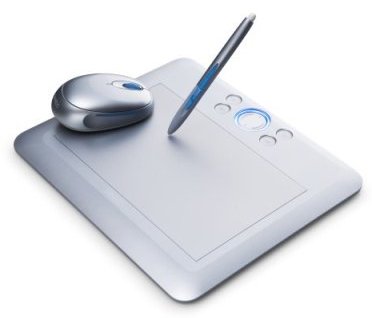
The first step is to purchase a Bamboo Fun, one of Wacom's inexpensive graphics tablets. I have been wanting to try out a graphics tablet for some time and this was an excellent opportunity to do so. I went with the small silver Fun which was less than $100 at the local electronics store.
 The Bamboo Fun comes with Photoshop Elements (4.0 for the Mac), Corel Painter Essentials 3.0 and Nik Color Efex Pro 2.0 GE but it also includes Wacom "privileges" which give you the opportunity to purchase other products at discount, including Photoshop CS3.
Step 2: Use Your Privileges
Currently you can find the Bamboo Fun Photoshop discount page here. From there enter your information and it will take you to the Adobe store. The Adobe store indicates the offer is valid through November 30, 2008.
Step 3: The Adobe Store
At the Adobe store add Photoshop CS3 to the shopping cart - the discounted price should be displayed. Now head to Google and try something like "adobe promotion code" (without the quotes). You should be able to find codes to allow for even greater savings. I found one for 15% off of the total order.
Adobe is also currently offering discounts off Lightroom 2 if you purchase Photoshop at the same time but I couldn't get it to work with the checkout process. I'm not sure if I want to go with Aperture, Lightroom or neither so I just ordered CS3.
Summary
So to summarize, here is what I ended up getting:
- Bamboo Fun tablet
- Photoshop Elements 4.0
- Corel Painter Essentials 3.0
- Nik Color Efex 2.0 GE
- Photoshop CS3
All for less that $400. Photoshop CS3 full by itself lists for $649. Happy shopping.


 Posts
Posts