It has been a while since my last post (moving out of state will do that). Since no one is reading it doesn't really matter much but for future reference for myself I wanted to mention something about VMware Fusion and some issues with Unity. For those not familiar with VMware Fusion it allows you to run other operating systems while booted into Mac OS X. In my case I run Windows XP (from the Boot Camp partition) and occasionally Linux but you can run just about any x86-based operating system. In the case of Windows there is special support in Fusion for hiding the Windows desktop and only displaying the running Windows windows on your Mac OS X desktop. It is rather cool to see Windows applications sitting right next to OS X apps.
So it was a bit distressing when all of a sudden one day I couldn't run Unity. That meant that I had the whole Windows XP desktop open which is clunky when you are going back and forth between a Windows application and an OS X application. Unity makes much better use of screen real estate. I couldn't immediately figure out what was wrong, the Unity button and menu items in VMware were grayed out. The other odd occurrence was the Application menu in Fusion, normally it includes the Windows Start Menu items but all it had was a Launch entry and that didn't work.
I tried just about everything I could think of including deinstalling VMware 2.0 and going back to my boxed version of 1.6. That didn't work and a VMware forum search only produced a few hits and nothing that really applied in my situation. After living with the problem for about a month in a fit of desperation I started uninstalling Windows programs in the hopes that perhaps one of them was causing the issue. I tried to deinstall any programs that I had installed since Unity stopped working, although I couldn't remember exactly when it was (I should have written it down). Lo and behold after uninstalling several programs I think I found the culprit. I had installed the software package for the HP Photosmart C4480 that came free with my Mac. I could already use it in OS X but I wanted to use it in Windows for some reason I can't recall. After deinstalling all of that suddenly Unity was back and I was happy.
Now I'm not positive that it was just the HP software that caused the problem, I haven't reinstalled to check since I am just printing from OS X at the moment, and I did uninstall several other programs around the same time. In the end the lesson is to keep track of what was just installed if Unity stops working. There may be a way to take a VMware snapshot before installing a program so you can roll it back but I haven't tried that - I am using a Boot Camp install and I'm not sure it works for that.
I am feeling a sense of Unity and Peace...
Showing posts with label Windows XP. Show all posts
Showing posts with label Windows XP. Show all posts
Monday, January 26, 2009

Monday, August 11, 2008
Ten Days in
It's now 10 days with the new iMac and things are going well. A few notes about a few things follow.
VMware Fusion
Taking a general census of various opinion about Parallels and VMware Fusion had me leaning toward Fusion. I have used VMware products on the PC and so I downloaded the trial, installed and away it went. I was impressed with the process, it was very simple and found my Boot Camp Windows XP install without any problem.
I'm still using Windows for Money (I'm scared of Mac Quicken), CD printing to my Epson R200 (I can't get that part working on Mac yet), Office products with VBA scripting (I have a number of Excel spreadsheets that won't work on Mac Office) and ActiveSynching my Windows Mobile Phone (no I don't have an iPhone, leave me alone).
The VMware Unity feature that hides the Windows desktop and displays the active Windows windows on the Mac desktop is way cool. Blended Mac and Windows. It's as though I'm having OS/2 flashbacks, only better. The only problem so far is that it's a little flakey with Spaces, trying to move a Unity window to another space behaves strangely.
Amazon has VMware Fusion for $59.99 US plus a $20 mail in rebate. Well worth the money, I ordered my copy. It arrived and I just updated the license of the trial I installed with the boxed copy I purchased and didn't even have to reinstall.
Microsoft Office Mac
I installed it. Only to promptly have it download a bunch of updates several times. So far I haven't used it much, especially since as noted above many of my Excel spreadsheets use VBA scripting. I guess Word will probably see some use eventually but I'm doing pretty well without it right now. Fortunately it didn't cost me much otherwise I would probably just do without and use Office under VMware/Boot Camp when necessary.
Max for Mac
Looking for a Mac CD ripper I ran across one that does everything I need and was doing under windows: Max
This little gem allows me to rip to FLAC (for archival), ogg (for my portable audio player...no I don't have an iPod, leave me alone) and mp3 (for everything else) simultaneously. It hooks into MusicBrainz for tag info and after specifying how and where to encode and name the files my ripping workflow is as simple as insert CD, start Max, go.
The Rest
I'm still getting used to things but it is getting better. My dock is evolving to include the stuff I use and I am starting to take advantage of Spotlight. I'm still not a Finder fan, it seems clumsy but I'm living with it for now. I'll look at alternatives later.
I was having some trouble with the built-in shared desktop client connecting to my windows machine. I was using TightVNC on the windows machine and the Mac client kept crashing so I am now using JollysFastVNC and results are much better.
VMware Fusion
Taking a general census of various opinion about Parallels and VMware Fusion had me leaning toward Fusion. I have used VMware products on the PC and so I downloaded the trial, installed and away it went. I was impressed with the process, it was very simple and found my Boot Camp Windows XP install without any problem.
I'm still using Windows for Money (I'm scared of Mac Quicken), CD printing to my Epson R200 (I can't get that part working on Mac yet), Office products with VBA scripting (I have a number of Excel spreadsheets that won't work on Mac Office) and ActiveSynching my Windows Mobile Phone (no I don't have an iPhone, leave me alone).
The VMware Unity feature that hides the Windows desktop and displays the active Windows windows on the Mac desktop is way cool. Blended Mac and Windows. It's as though I'm having OS/2 flashbacks, only better. The only problem so far is that it's a little flakey with Spaces, trying to move a Unity window to another space behaves strangely.
Amazon has VMware Fusion for $59.99 US plus a $20 mail in rebate. Well worth the money, I ordered my copy. It arrived and I just updated the license of the trial I installed with the boxed copy I purchased and didn't even have to reinstall.
Microsoft Office Mac
I installed it. Only to promptly have it download a bunch of updates several times. So far I haven't used it much, especially since as noted above many of my Excel spreadsheets use VBA scripting. I guess Word will probably see some use eventually but I'm doing pretty well without it right now. Fortunately it didn't cost me much otherwise I would probably just do without and use Office under VMware/Boot Camp when necessary.
Max for Mac
Looking for a Mac CD ripper I ran across one that does everything I need and was doing under windows: Max
This little gem allows me to rip to FLAC (for archival), ogg (for my portable audio player...no I don't have an iPod, leave me alone) and mp3 (for everything else) simultaneously. It hooks into MusicBrainz for tag info and after specifying how and where to encode and name the files my ripping workflow is as simple as insert CD, start Max, go.
The Rest
I'm still getting used to things but it is getting better. My dock is evolving to include the stuff I use and I am starting to take advantage of Spotlight. I'm still not a Finder fan, it seems clumsy but I'm living with it for now. I'll look at alternatives later.
I was having some trouble with the built-in shared desktop client connecting to my windows machine. I was using TightVNC on the windows machine and the Mac client kept crashing so I am now using JollysFastVNC and results are much better.
Saturday, July 26, 2008
Back to the Future
Well my first post ran a little long, I'll try to keep this one shorter.
My current office setup includes two Intel-ish PCs, one running Windows XP and one running Fedora 9. I typically use the Linux (ok GNU/Linux, get off my case) machine for email, browsing, programming and occasional image editing. I use the Windows machine mostly for finances, browsing, games, serving files, image editing and ripping my CDs. Both computers are hooked to an old Sony Trinitron 17" CRT monitor via a KVM switch. To get an idea of how out-of-date my setup appears I will include a picture:

Ok, that is kind of embarrassing, it looks like I swiped everything from a dorm room and stuck it in the corner of my home office. My goal is to replace everything with the new iMac currently on the FedEx truck making its way here.
I don't expect this to be an entirely smooth process. I've been out of the Mac OS game far too long to be comfortable with it and I plan to try and transition in stages. Ultimately I am going to need the following that I can think of at the moment:
My current office setup includes two Intel-ish PCs, one running Windows XP and one running Fedora 9. I typically use the Linux (ok GNU/Linux, get off my case) machine for email, browsing, programming and occasional image editing. I use the Windows machine mostly for finances, browsing, games, serving files, image editing and ripping my CDs. Both computers are hooked to an old Sony Trinitron 17" CRT monitor via a KVM switch. To get an idea of how out-of-date my setup appears I will include a picture:
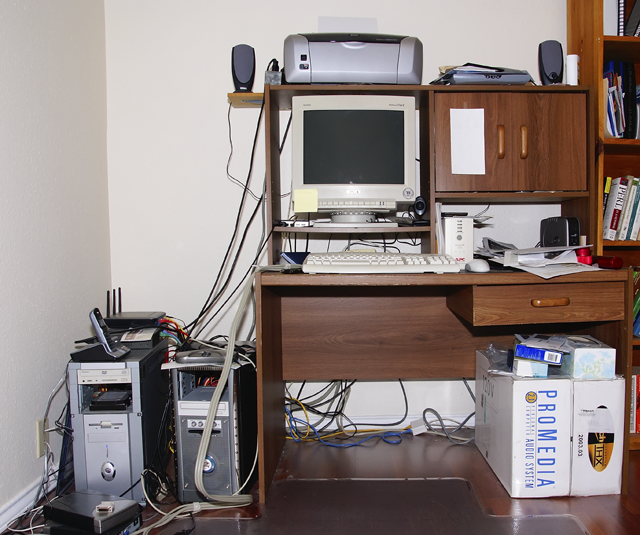
Ok, that is kind of embarrassing, it looks like I swiped everything from a dorm room and stuck it in the corner of my home office. My goal is to replace everything with the new iMac currently on the FedEx truck making its way here.
I don't expect this to be an entirely smooth process. I've been out of the Mac OS game far too long to be comfortable with it and I plan to try and transition in stages. Ultimately I am going to need the following that I can think of at the moment:
- Email (currently Thunderbird in Linux)
- Web browsing (ubiquitous)
- Personal finance tracking (currently MS Money)
- Image editing (currently Windows XP Adobe Elements and Linux GIMP)
- File serving to my PS3 (currently Windows XP using TVersity)
- File serving to my HTPC (currently Windows XP SMB)
- CD ripping to mp3, ogg and FLAC (currently EAC under Windows XP)
- Programming (currently shell scripts, Java 1.6 and Eclipse in Linux)
- Games (I'll tackle this topic later)
- I'm sure I'm missing stuff, I'll fill it in as I go
Subscribe to:
Posts (Atom)

 Posts
Posts